Toyota Corolla: Instrument cluster / Gauges and meters (4.2-inch display)
Meter display
■ Locations of gauges and meters

The units of measure may differ depending on the intended destination of the vehicle.
A - Tachometer Displays the engine speed in revolutions per minute
B - Speedometer
C - Outside temperature<> Displays the outside temperature within the range of -40°F (-40°C) to 122°F (50°C)
D - Clock (®P.93)
E - Multi-information display<> Presents the driver with a variety of vehicle data (®P.100)<> Displays warning messages if a malfunction occurs (®P.521)
F - Odometer and trip meter display (®P.92)
G - Shift position indicator (®P.169)
H - Display change button (®P.92)
I - Fuel gauge<> Displays the quantity of fuel remaining in the tank
J - Engine coolant temperature gauge<> Displays the engine coolant temperature
■Outside temperature display
- In the following situations, the correct outside temperature may not be
displayed, or the display may take longer than normal to change:
- When stopped, or driving at low speeds (less than 16 mph [25 km/h])
- When the outside temperature has changed suddenly (at the entrance/exit of a garage, tunnel, etc.)
- When “--” or “E” is displayed, the system may be malfunctioning. Take your vehicle to your Toyota dealer.
■Liquid crystal display
WARNING
■The information display at low temperatures
Allow the interior of the vehicle to warm up before using the liquid crystal information display. At extremely low temperatures, the information display monitor may respond slowly, and display changes may be delayed.
For example, there is a lag between the driver’s shifting and the new gear number appearing on the display. This lag could cause the driver to downshift again, causing rapid and excessive engine braking and possibly an accident resulting in death or injury.
NOTICE
■To prevent damage to the engine and its components
- Do not let the indicator needle of the tachometer enter the red zone, which indicates the maximum engine speed.
- The engine may be overheating if the engine coolant temperature gauge is in the red zone (H). In this case, immediately stop the vehicle in a safe place, and check the engine after it has cooled completely.
 Indicators
T..
 Odometer and trip meter display
■ Changing the display
Press the display change button until the desired item is displayed.
■ Display items
Odometer
Displays the total distance the vehicle has been driven...
Other information:
Toyota Corolla 2019-2026 Owners Manual: Bluetooth® audio
The Bluetooth® audio system enables users to enjoy listening to music that is played on a portable player on the vehicle speakers via wireless communication. This audio/visual system supports Bluetooth®, a wireless data system capable of playing portable audio music without cables...
Toyota Corolla 2019-2026 Owners Manual: Installing tire pressure warning valves and transmitters (vehicles with a tire pressure warning system)
When replacing tires or wheels, tire pressure warning valves and transmitters must also be installed. When new tire pressure warning valves and transmitters are installed, new ID codes must be registered in the tire pressure warning computer and the tire pressure warning system must be initialized...
Categories
- Manuals Home
- 12th Generation Corolla Owners Manual
- Odometer and trip meter display
- Sound settings
- PCS (Pre-Collision System)
- New on site
- Most important about car
General settings
Settings are available for clock, operation sounds, etc.
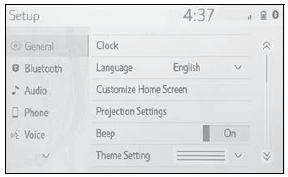
Displaying the general settings screen
1 Press the “MENU” button.
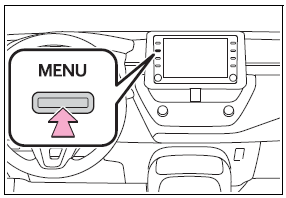
2 Select “Setup”.
If the general settings screen is not displayed, select “General”.
3 Select the desired items to be set.