
Toyota Corolla: Doors / Automatic door locking and unlocking systems
Toyota Corolla 2019-2026 Owners Manual / Before driving / Doors / Automatic door locking and unlocking systems
The following functions can be set or canceled:
For instructions on customizing,

 Rear door child-protector lock
The door cannot be opened from inside the vehicle when lock is set.
1 Unlock
2 Lock
These locks can be set to prevent children from opening the rear doors...
 Trunk
Trunk
The trunk can be opened using the trunk opener, entry function or wireless remote
control or key.
WARNING
Observe the following precautions. Failure to do so may result in death or
serious injury...
Other information:
Toyota Corolla 2019-2026 Owners Manual: Heated steering wheel/seat heaters
Heated steering wheel Warms up the grip of the steering wheel Seat heaters Warm up the seat upholstery WARNING ■ To prevent minor burn injuries Care should be taken if anyone in the following categories comes in contact with the steering wheel or seats when the heater is on: Babies, small children, the elderly, the sick and the physically challenged Persons with sensitive skin Person..
Toyota Corolla 2019-2026 Owners Manual: For safe use
Before driving Observe the following before starting off in the vehicle to ensure safety of driving. Floor mat Use only floor mats designed specifically for vehicles of the same model and model year as your vehicle. Fix them securely in place onto the carpet. 1. Insert the retaining hooks (clips) into the floor mat eyelets. 2 Turn the upper knob of each retaining hook (clip) to secure the floor..
Categories
- Manuals Home
- 12th Generation Corolla Owners Manual
- Lubrication system (1.8 L 4-cylinder [2ZR-FAE] engine)
- Electric parking brake
- Operating instructions
- New on site
- Most important about car
Screen adjustment
The contrast and brightness of the screen display and the image of the camera display can be adjusted. The screen can also be turned off, and/or changed to either day or night mode.
(For information regarding audio/visual screen adjustment)
Displaying the screen adjustment screen
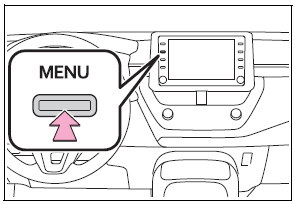
1 Press the “MENU” button.

Copyright © 2026 www.tocorolla12.com