
Toyota Corolla: Maintenance and care / Maintenance
Toyota Corolla 2019-2026 Owners Manual / Maintenance and care / Maintenance
 Cleaning and protecting the vehicle interior
Perform cleaning in a manner appropriate to each component and its material.
Protecting the vehicle interior
Remove dirt and dust using a vacuum cleaner...
 Maintenance requirements
To ensure safe and economical driving, day-to-day care and regular maintenance
are essential. It is the owner’s responsibility to perform regular checks...
Other information:
Toyota Corolla 2019-2026 Owners Manual: Automatic High Beam
The Automatic High Beam uses a camera sensor located behind the upper portion of the windshield to assess the brightness of the lights of vehicles ahead, streetlights, etc., and automatically turns the high beams on or off as necessary. WARNING ■Limitations of the Automatic High Beam Do not overly rely on the Automatic High Beam...
Toyota Corolla 2019-2026 Owners Manual: Type B: Function achieved by using DCM and the system
The functionality of Wi-Fi® Hotspot is made possible through the shared work of the DCM and the system. This service is available by subscription and supported by the Toyota response center, which operates 24 hours a day, 7 days a week. Before using the function ■ Subscription After you have signed the Telematics Subscription Service Agreement and are enrolled, you can begin receiving servic..
Categories
- Manuals Home
- 12th Generation Corolla Owners Manual
- Electric parking brake
- General settings
- Transfer contacts from device
- New on site
- Most important about car
Unlocking and locking the doors from the outside
■ Smart key system (if equipped)
Carry the electronic key to enable this function.
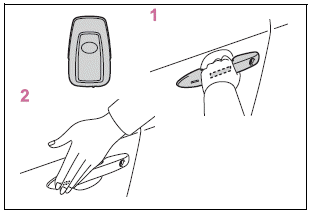
1 Grip the driver’s door handle to unlock the door. Holding the driver’s door handle for approximately 2 seconds unlocks all the doors. Grip the front passenger’s door handle to unlock all the doors.*

Copyright © 2026 www.tocorolla12.com